
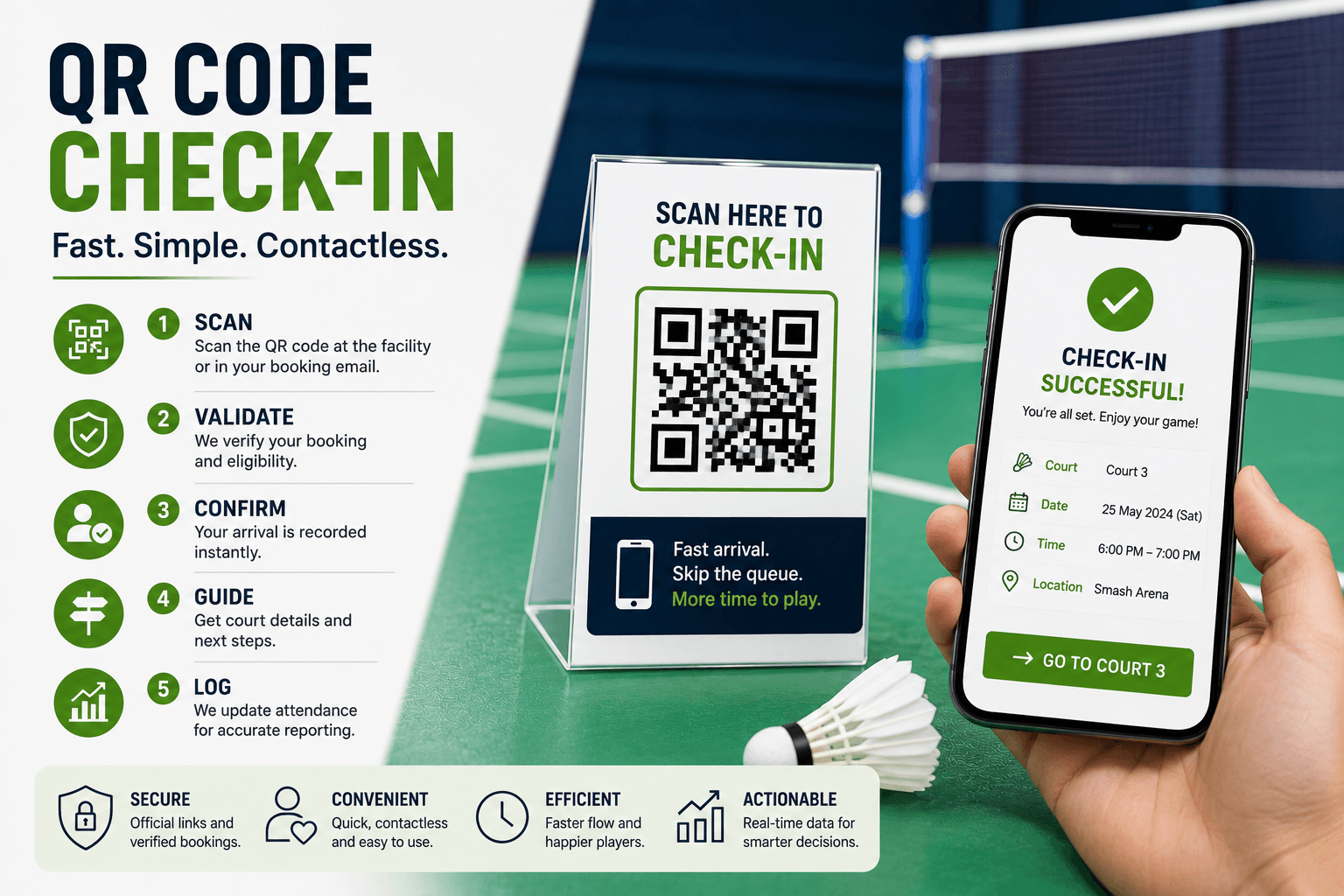
QR Code Check-In for Badminton Facilities
Learn how badminton QR check-in works, compare public and booking-specific codes, improve security, support accessibility, and track arrival performance.
Rush hour at your badminton venue is always chaotic, with players arriving while staff are still scrambling to find people's reservations, sort out payments, and try and keep track of who's who on which court.
Badminton QR check in can really turn things around, but only if you set it up so that it seamlessly opens up that booking process for staff to work with. And it's super important to remember that that QR code is only supposed to trigger a booking check, not serve as some kind of ID or proof that someone is actually there on site.
To make it work, a solid system should take the code, validate the booking, keep a record of the player's arrival, give players clear instructions on which court to head to, and also give them another way to check in if the QR code doesn't work.
What Is QR Code Check-In?
QR code check in is a digital arrival process in which scanning a code opens or identifies a secure workflow for validating a reservation and recording the player’s arrival.
A QR code may:
- Open a facility check-in page
- Identify an entrance or location
- Retrieve a booking-specific workflow
- Begin customer or membership lookup
- Start limited booking verification
The code itself should not normally contain complete customer, payment, or reservation details. It should direct the player to a controlled system that checks the current booking record.
How QR Check-In Differs from Other Models
Digital check-in includes any arrival recorded through a digital interface, including workflows completed by staff. Read Digital Check-In for Badminton Facilities for the broader process.
Contactless check-in is designed to reduce direct staff interaction. See Contactless Check-In for Badminton Facilities for more guidance.
QR check-in uses a scanned code to begin the arrival workflow.
Unattended access may allow players to enter without staff being present. A QR scan does not automatically create unattended entry or provide sufficient access control.
Choose the Right QR Model
Facility QR Code
A shared code near the entrance opens a general check-in page.
This is easy to display, but the player must still locate the correct booking. A photo may also be scanned remotely, and a fake sticker could cover the official code.
Booking-Specific QR Code
A unique code is sent with one reservation.
This may speed up booking retrieval and reduce typing. However, screenshots can be shared, and the code must expire or be protected against reuse.
Customer or Membership QR Code
A reusable code identifies a regular customer or member.
This may simplify repeat arrivals, but it does not necessarily identify which booking the player is attending. The system must still validate the current reservation.
No single model is best for every facility.
Follow a Five-Step QR Check-In Workflow
1. Scan
The player scans an official facility or booking-specific code.
The destination should use:
- The facility’s official domain
- A secure connection
- Recognizable branding
- A mobile-friendly page
- A visible support option
2. Validate
The booking system should verify:
- Code or token validity
- Facility and location
- Booking date and time
- Reservation status
- Whether check-in is open
- Whether the code expired
- Whether it was already used
- Payment or membership status where relevant
The scan provides information. The booking system decides whether check-in is valid. GVSU
3. Confirm
Possible outcomes include:
- Checked in
- Too early
- Booking not found
- Booking canceled
- Payment required
- Code invalid
- Code expired
- Already checked in
- Staff assistance required
4. Guide
After successful validation, show:
- Court number
- Start time
- Entrance or route
- Equipment pickup
- Delay information
- Support option
5. Log
Record:
- Booking used
- Check-in time
- QR method
- Result
- Failure reason
- Staff intervention
- Relevant status changes
Keep Sensitive Information Out of the Code
Do not embed:
- Full customer name
- Email address
- Phone number
- Payment information
- Complete booking details
- Account credentials
- Reusable access secrets
A safer QR code may contain an official URL and a random booking token that the server validates before displaying information.
Customers should not be able to alter a booking reference in the URL and view another person’s reservation. booking token
Separate QR, Booking, Payment, and Arrival Status
These statuses answer different questions.
QR Status
- Valid
- Invalid
- Expired
- Revoked
- Already used
Booking Status
- Confirmed
- Awaiting payment
- Canceled
- Completed
Payment Status
- Pending
- Successful
- Failed
- Refunded
Arrival Status
- Not arrived
- Checked in
- Arrived late
- Assistance required
- Visit completed
A useful message might say:
QR accepted — checked in, but staff assistance is required for the remaining balance.
A valid scan should not mark every part of the reservation complete.
Give Players Clear Next Steps
A successful check-in page should answer:
- Did the scan work?
- Was arrival recorded?
- Which booking was found?
- Which court should the player use?
- When does play begin?
- Is equipment ready?
- Is staff help required?
For example:
You are checked in for Court 3 from 7:00–8:00 p.m. Collect your rental racket from reception before entering the court.
“Scan successful” alone is not enough.
Clear arrival instructions are only one part of a smooth player journey. How to Improve the Badminton Booking Experience at Your Facility explains how booking, payment, confirmations, reminders, check-in, and follow-up work together to create a better overall experience.
Do Not Treat a Scan as Proof of Attendance
A code scan should not be treated as proof of attendance because of the ways it can be abused, including scanning before arrival, using a photo of the code, someone else scanning it, scanning at the wrong location, or using it if the participant is absent.
To ensure integrity, organizations can implement time constraints, unique verification codes, booking tokens, manual checks by staff, kiosk checks, access logs, and reconciliations, depending on the level of risk and complexity at their facility.
Preserve Accessibility and a Non-QR Option
Not every player can or wants to scan a code.
Provide alternatives such as:
- Booking-reference lookup
- Secure direct link
- Customer account
- Kiosk
- Printed confirmation
- Staff lookup
- Manual attendance recording
QR signs should have readable instructions, good contrast, suitable size, accessible placement, and a clearly visible alternative method.
QR check-in should add convenience without becoming the only way to receive the booked service. provide an accessible alternative to a QR code
Plan for Scan and System Failure
Potential problems include:
- Camera cannot read the code
- Printed code is damaged
- Wrong or fraudulent code
- Poor internet connection
- Website outage
- Token expired
- Booking canceled
- Wrong facility
- Dead phone
- Duplicate scan
- Authentication failure
Use this fallback process:
- Open the official check-in page or search by booking reference.
- Verify the reservation.
- Record arrival through a staff system or temporary list.
- Provide court and equipment instructions.
- Record the failure reason.
- Reconcile the records later.
Track QR Check-In Performance
| Metric | What It Measures |
|---|---|
| QR adoption rate | QR check-ins compared with eligible bookings |
| Scan-to-completion rate | Successful check-ins compared with QR starts |
| QR failure rate | Failed or abandoned QR check-ins |
| Average check-in time | Time from scan to confirmation |
| Staff-assistance rate | QR check-ins requiring staff help |
| Invalid-code rate | Invalid, expired, or revoked scans |
| Arrival accuracy | QR records compared with physical attendance |
| Support rate | QR-related questions compared with eligible arrivals |
Segment results by facility code versus booking-specific code, first-time versus returning players, members versus guests, and individual versus group bookings.
Speed should be judged alongside failure, assistance, trust, and attendance accuracy.
How Software Can Support QR-Based Arrivals
Connected software may help facilities manage reservation lookup, payment visibility, customer records, arrival status, court instructions, communication, and reporting.
Nesbook can help badminton facilities connect reservations, schedules, payments, customer records, self-check-in, communication, and reporting so arrival information can be managed through a more consistent workflow.
Specific QR generation, scanning, token expiration, attendance reporting, and door-access capabilities depend on the platform and configuration.
Frequently Asked Questions
How does QR code check-in work at a badminton facility?
The player scans an official code, the booking system validates the reservation and timing, arrival is recorded, and the player receives court or support instructions.
Should facilities use one public QR code or booking-specific codes?
A public code is simpler but requires further booking lookup. Booking-specific codes may speed retrieval but require secure token handling, expiration, and protection against sharing.
Is QR code check-in secure?
It can be secure when the code opens an official, encrypted, server-validated workflow. Facilities should protect against copied codes, fake stickers, unsafe links, and unauthorized booking access.
Can booking software connect QR codes with badminton reservations?
Some platforms may support QR generation, validation, check-in, and attendance tracking. Exact QR-specific functionality depends on the platform and configuration.
Conclusion
QR code check-in works best when the code opens a controlled booking workflow rather than acting as the reservation itself.
Choose the appropriate QR model, validate codes and bookings through the system, keep payment and arrival statuses separate, provide clear court instructions, protect against tampering, and preserve an accessible non-QR option.
Then pilot the workflow and measure completion, failures, staff assistance, trust, and attendance accuracy before expanding.