Shared Workspace Booking Software Explained | Nesbook
Learn what shared workspace booking software is, who uses it, and how it simplifies reservations, payments, and scheduling for flexible workspaces.
Shared workspace booking software is a digital platform that helps businesses manage reservations for desks, meeting rooms, offices, and other shared spaces. It allows customers to view availability, choose a time, and make a booking online, while giving operators a central system for scheduling, payments, and customer management.
For coworking spaces and flexible workspace providers, the value goes beyond replacing a booking calendar. The right system connects the customer journey with the daily work of running a venue, helping operators reduce manual administration and make more of their available space.
What is Shared Workspace Booking Software and Who Uses it?
Shared workspace booking software manages reservations for desks, meeting rooms, offices, and other shared spaces. Customers can view availability and book a suitable time, while operators can organize schedules, manage spaces, collect payments, and keep booking information in one place.
The term what is coworking booking software usually refers to the same type of solution. A workspace reservation platform is another common name for software that helps businesses manage shared space bookings by the hour, day, or membership period.
Shared workspace booking software is useful for businesses that offer flexible access to physical workspaces. It can support a range of customer types and booking models.
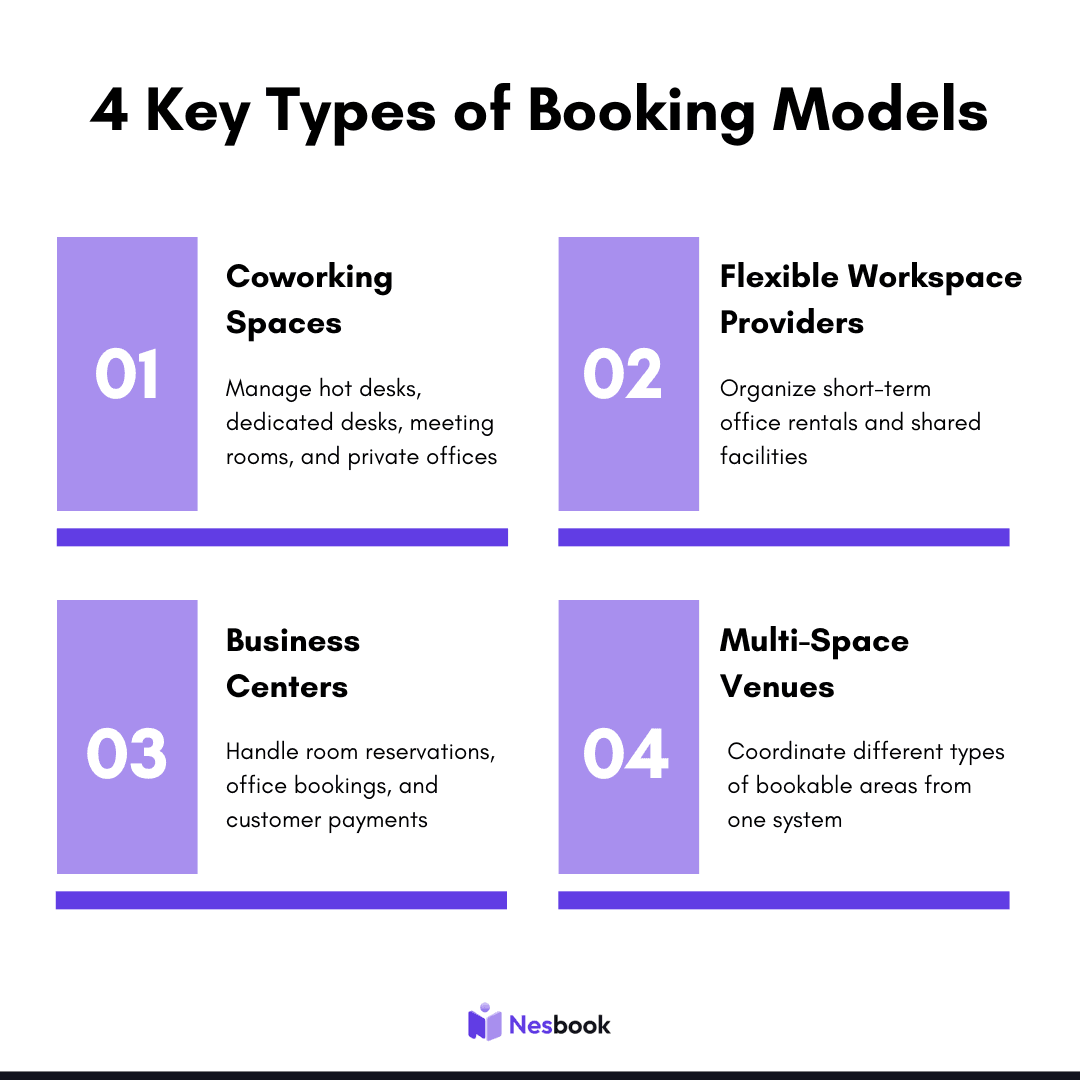
The software is especially useful when a venue offers different services with separate availability rules. A centralized booking system helps operators manage meeting rooms and desks without relying on separate calendars or manual updates.
What can be Booked?
The spaces available for booking depend on the business, but shared workspace booking software commonly supports several types of inventory. These space types typically include:
- Hot desks: Flexible, short-term workspace access
- Dedicated desks: Reserved workspace for members
- Private offices: Dedicated space for individuals or teams
- Meeting rooms: Client meetings, workshops, and presentations
- Conference rooms: Larger meetings and group sessions
- Event spaces: Business events, networking, and community activities
Some workspaces may also offer virtual offices, business addresses, or specialized spaces such as podcast booths. The important consideration is whether the booking system can represent the inventory you actually sell and the way customers need to reserve it.
How do Workspace Reservations and Payments Work?
A typical booking process follows a simple path from availability to confirmation. Customers browse available spaces, select a suitable date and time, and complete their reservation. The process can also include payment, depending on the workspace and its booking model.
- View available space: Customers browse the workspace options and choose the type of space they need.
- Select a date and time: The customer chooses an available slot based on the space schedule.
- Confirm and pay: The customer provides the required details and completes payment when applicable.
- Receive confirmation: The reservation is recorded, and the customer receives the relevant booking information.
For operators, the system keeps availability and reservations organized, while connecting confirmed bookings to the workspace calendar. It can also link reservations with payment collection, depending on the platform and business model.
Customers may pay at the time of booking, while members may use credits, subscriptions, or other agreed payment arrangements. The system should make it clear what the customer is paying for, when payment is required, and what happens if a reservation is cancelled. For operators, connecting payments with bookings can make it easier to track revenue and reduce the administrative work involved in collecting and reconciling payments manually.
What are the Benefits of Shared Workspace Booking Software?
The main benefit is a more organized booking experience for both customers and staff. When reservations, scheduling, and payments are connected, operators can spend less time managing individual booking requests and more time improving the workspace experience.
Less Manual Administration
Instead of handling every reservation through phone calls, messages, or spreadsheets, operators can give customers a direct way to book available space. This can reduce repetitive work and make it easier to manage bookings outside normal office hours.
Better Visibility Into Availability
A centralized system helps operators see which spaces are available, reserved, or occupied. This makes it easier to manage different room types and avoid scheduling conflicts. It also gives staff a clearer view of upcoming bookings, helping them plan daily operations more efficiently.
Easier Customer Experience
Customers can view options, choose a suitable time, and complete their reservation without waiting for staff to respond. A clearer booking process can make it easier for people to move from interest to a confirmed reservation.
More Connected Operations
When reservations, payments, and customer notifications are connected, operators can manage the booking journey from one place. Platforms such as Nesbook are designed to support this operational connection, with features for online booking, smart scheduling, automated payments, multi-space management, customer notifications, and analytics.
Shared Workspace Booking Software vs. Manual Booking
Manual booking can work for a small workspace with limited inventory and a low volume of reservations. However, it becomes harder to manage as the business adds more spaces, customers, or booking types.
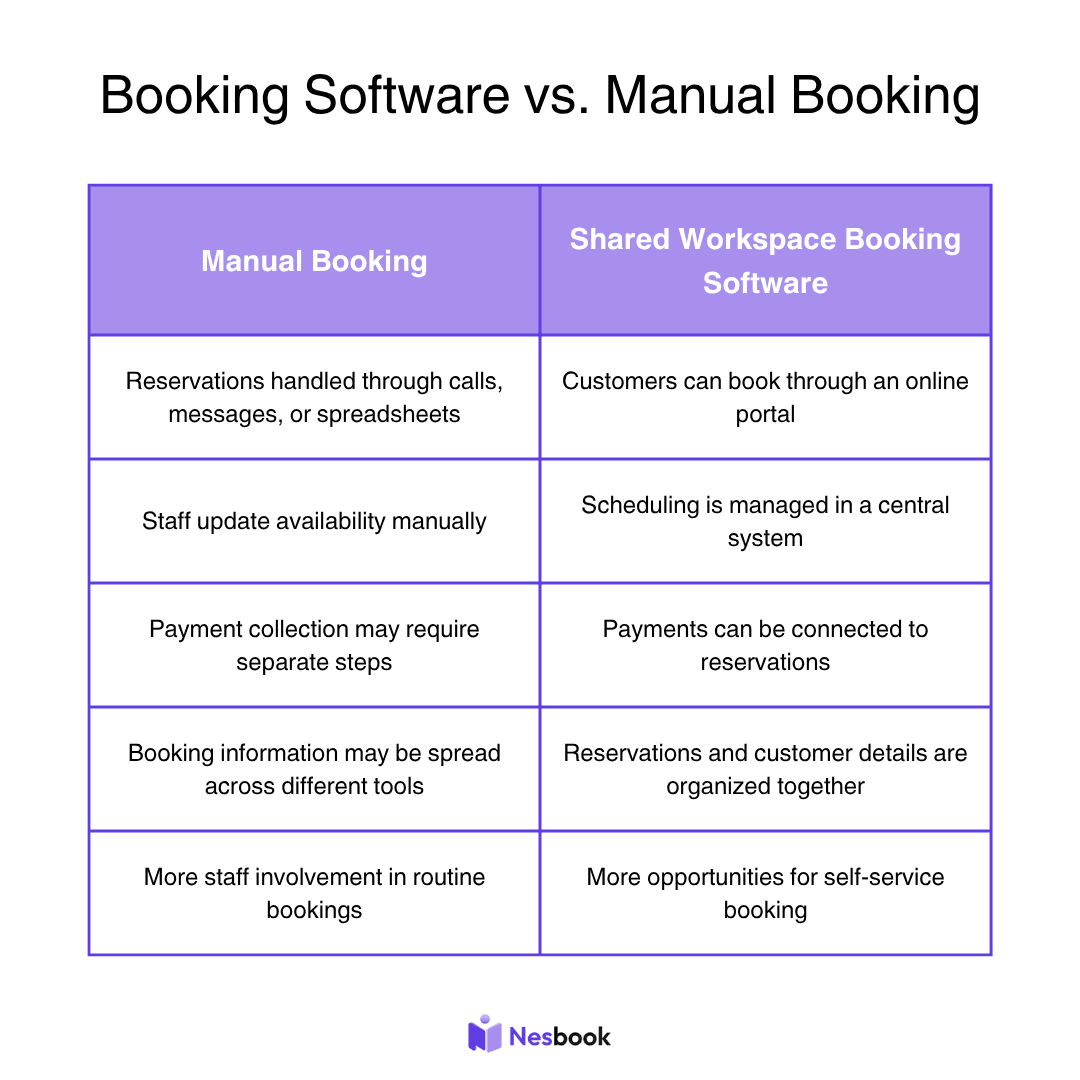
The right choice depends on the size and complexity of the business. For a venue with multiple bookable spaces, a dedicated booking system can provide a more consistent way to manage reservations and customer demand.
Explore Shared Workspace Booking
If your workspace is still managing reservations through calls, messages, or spreadsheets, a dedicated booking system can help bring the process into one place. Nesbook provides tools for online booking, scheduling, payments, and multi-space management, helping operators create a more connected reservation experience.
Explore shared workspace booking to see how a booking platform can support your workspace operations and make it easier for customers to reserve the space they need. You can also contact our team for further understanding as you step into the world of booking software.
Frequently Asked Questions
Is shared workspace booking software the same as coworking booking software?
Shared workspace booking software and coworking booking software generally refer to the same type of reservation system. Both help businesses manage available workspaces, customer bookings, and related operations. The terms are often used interchangeably, although shared workspace booking software can also apply to businesses outside traditional coworking.
Can shared workspace booking software manage multiple types of spaces?
Yes, depending on the platform. Many systems are designed to manage different types of bookable inventory, such as desks, meeting rooms, and private offices. Operators should check whether the software supports the space types, availability rules, and booking durations their business requires.
Does shared workspace booking software replace a workspace management system?
Not necessarily. Booking software focuses on reservations, while a broader workspace management system may include additional operational tools. Some platforms combine booking with scheduling, payments, customer notifications, and analytics, allowing operators to manage more of the customer journey from one place.
Is shared workspace booking software useful for small coworking spaces?
It can be useful for small coworking spaces, especially when staff spend significant time handling reservations manually. A booking system can help organize availability, reduce repetitive administration, and give customers a more convenient way to reserve space.
What should I look for in a shared workspace booking platform?
Look for a system that supports your actual inventory, booking durations, payment requirements, and operational needs. It should also make it easy for customers to view availability and complete reservations, while giving operators a clear way to manage schedules and customer information.