Affordable Shared Workspace Booking Software: What Should You Expect?
Compare affordable shared workspace booking software, including pricing, hidden costs, essential features, and when a more complete platform is worth it.
If you run a shared workspace, the appeal of affordable booking software is easy to understand. You want customers to reserve desks, meeting rooms, or other spaces without adding another expensive system to your monthly overhead. The challenge is that a low subscription price does not always mean a low operating cost.
A tool may cover basic reservations while leaving payments, customer communication, reporting, and day-to-day administration to separate systems. The right choice depends on what your venue needs to manage. A small workspace with a few bookable rooms may need a straightforward reservation calendar.
A growing coworking business may need member access, recurring bookings, multiple locations, and financial reporting. The best coworking booking software for your business is the one that handles the work you actually do, rather than the one with the lowest advertised price.
This guide explains what to expect from affordable shared workspace booking software, where budget tools may fall short, and how to compare the total operational cost before making a decision. The aim is to help you find a platform that fits your current budget without creating unnecessary administrative work as your workspace grows.
What does Affordable Shared Workspace Booking Software Usually Include?
Affordable shared workspace booking software typically provides the core tools needed to make a space available online and manage reservations. Depending on the platform, this may include a booking calendar, availability management, customer details, and basic payment collection. Some tools also include automated notifications or simple reporting.
Core Booking Features to Expect
At a minimum, look for a system that allows customers to view available spaces and make reservations. Availability management is particularly important because it helps prevent double-bookings and keeps your inventory accurate. Depending on the platform, payment collection and automated notifications may also be included.
Basic Booking Tools vs. Wider Operations
The important distinction is between booking software that records reservations and booking software that supports the wider operation. A basic calendar can help prevent double-bookings, but it may not handle recurring memberships, multiple spaces, customer communication, or financial reconciliation. Those differences matter when comparing a low-cost tool with a more complete platform.
Match the Software to Your Workspace
Before comparing prices, define what you need the software to accomplish. A workspace that accepts occasional meeting room bookings has different requirements from a coworking venue managing daily desk reservations, private offices, and member access. The more of your operation a platform can manage in one place, the more useful it becomes when evaluating total cost.
Pricing Models to Compare
Booking software is usually priced through one of several common models. Understanding the model is important because the cheapest starting price may not remain the cheapest option as your bookings increase.
Monthly Subscription
A monthly subscription is often easier to budget for, but check whether the plan includes the features you need. A low-cost tier may exclude payment processing, advanced reporting, or additional locations. Per-booking fees can be attractive for a venue with low booking volume, but they may become expensive when reservations increase
Tiered Plans
Tiered plans require particular attention. A platform may appear affordable at the entry level, but the features that matter most to your business may only become available at a higher tier. Compare the plan you would realistically use, not just the lowest advertised price.
Hidden Costs that can Change the Real Price
The subscription is only one part of the cost of running booking software. A more useful comparison looks at the entire process from reservation to payment and administration.
Separate Tools You May Need
Consider whether you will need separate tools for:
- Payment collection and transaction reconciliation.
- Automated customer emails or booking reminders.
- Calendar synchronization.
- Member management or access control.
- Reporting and financial analysis.
- Website booking integration.
- Support for multiple spaces or locations.
How Separate Systems Increase Costs?
A tool may be inexpensive on its own but become more costly when several separate services are required to complete the same workflow. For example, if one system handles reservations, another collects payments, and a third manages customer communication, your team may spend additional time keeping those systems aligned.
Compare Total Operational Cost
This is where total operational cost becomes more useful than subscription price alone. Compare the cost of the booking platform, payment fees, additional software, and staff time required to keep everything working together.
When a More Complete Platform May Offer Better Value
For a growing workspace, a more complete platform such as Nesbook can be worth comparing against a collection of separate tools. The key question is whether the included features reduce the amount of manual work your team needs to do. A lower subscription price is less valuable if it creates more administration.
Essential Features Versus Advanced Features
Not every workspace needs the same feature set. The best approach is to separate the features that support your current operation from those that may become useful later. Some key features to consider are explained below.
| Feature | Why it Matters? |
|---|---|
| Online Booking | Lets customers reserve space without a phone call or email exchange. |
| Availability Management | Helps prevent double-bookings and keeps inventory accurate. |
| Automated Notifications | Reduces manual reminders and keeps customers informed. |
| Payment Collection | Makes it easier to accept bookings and track payments. |
| Multi-Space Management | Useful when you manage several rooms, desks, or locations. |
| Member Management | Helps organize recurring users and membership activity. |
| Reporting | Gives you visibility into bookings, revenue, and workspace usage. |
| Integrations | Connects booking activity with other tools when needed. |
A basic booking system may be enough if your operation is small and straightforward. However, if your team is manually confirming bookings, sending reminders, or reconciling payments, those tasks should be part of your evaluation.
Advanced features are not automatically better. The right question is whether they solve a real operational problem. A feature that saves staff time or improves booking accuracy may be more valuable than a long list of features that your team rarely uses.
Payment Fees, Member Limits, and Workspace Capacity
Payment processing is one of the most important costs to understand before choosing a booking platform. A software subscription may look affordable, but transaction fees can affect the total cost of every reservation. Check whether payment processing is included, whether different payment methods have different costs, and how refunds, cancellations, and payment disputes are handled.
A workspace with many small bookings may be more affected by transaction fees than a venue with fewer, higher-value reservations. Also consider the time your team spends checking payments, reconciling transactions, and following up on unpaid bookings. These costs can add up even when the software fee is low.
Member and usage limits matter when comparing affordable plans. Check the limits for members, staff accounts, locations, rooms, desks, and monthly bookings. A low-cost tool may suit a small workspace, but growing venues should confirm that it can scale without unnecessary costs or administrative work.
Reporting and Operational Visibility
Reporting is often where the difference between basic and more complete booking software becomes clear. A simple booking calendar can show what is reserved, but it may not tell you how your workspace is performing.
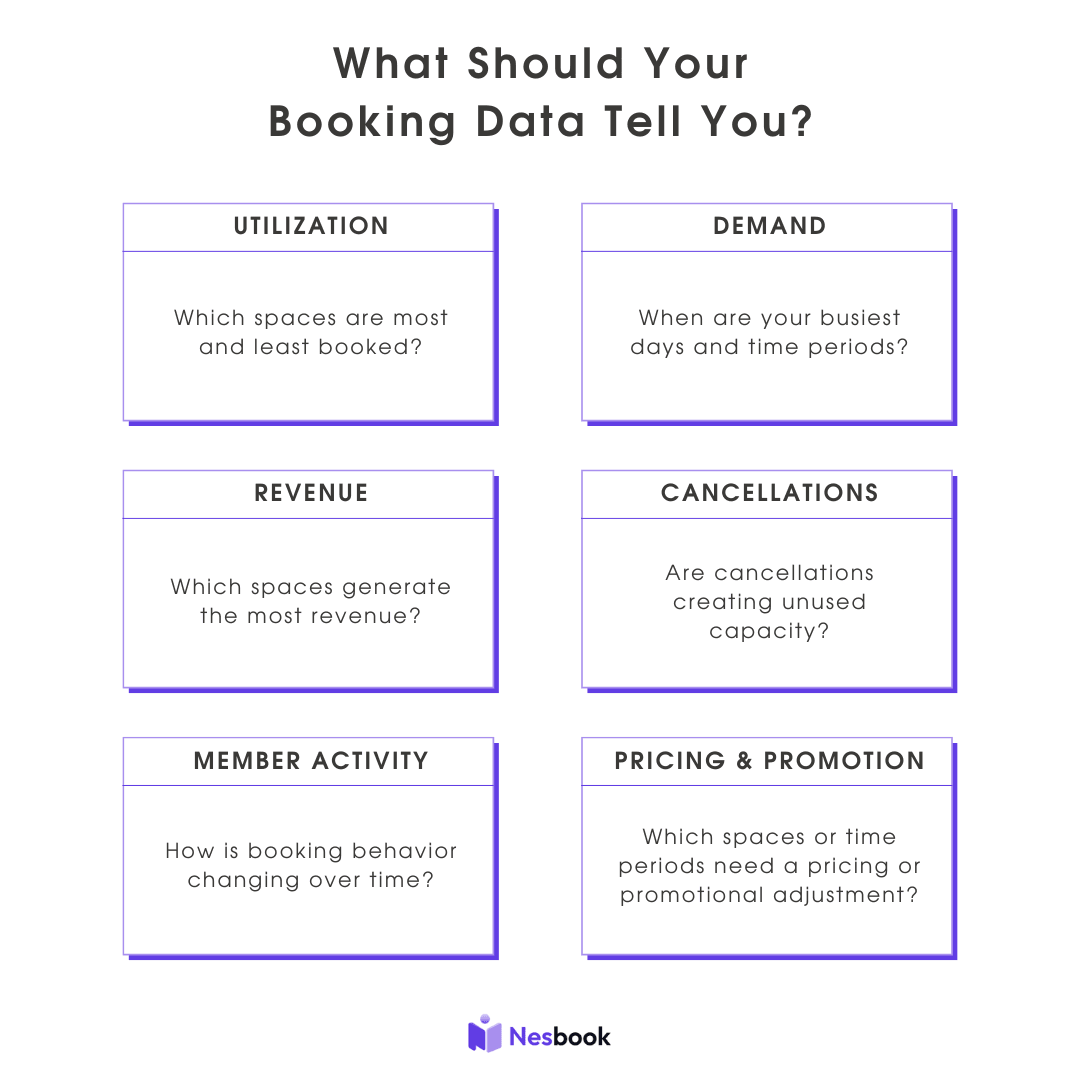
This information can support decisions about pricing, staffing, and inventory. For example, if meeting rooms are consistently full during certain hours but underused at other times, you may want to review your pricing or availability strategy.
A platform such as Nesbook can be useful when you want booking activity and operational reporting to work together. The value is not simply having more data. It is being able to use that data to make better decisions about your workspace.
When Should You Upgrade?
You should consider upgrading when your current booking system begins creating more work than it saves. This may happen when your team spends too much time managing reservations, payments, or customer communication manually.
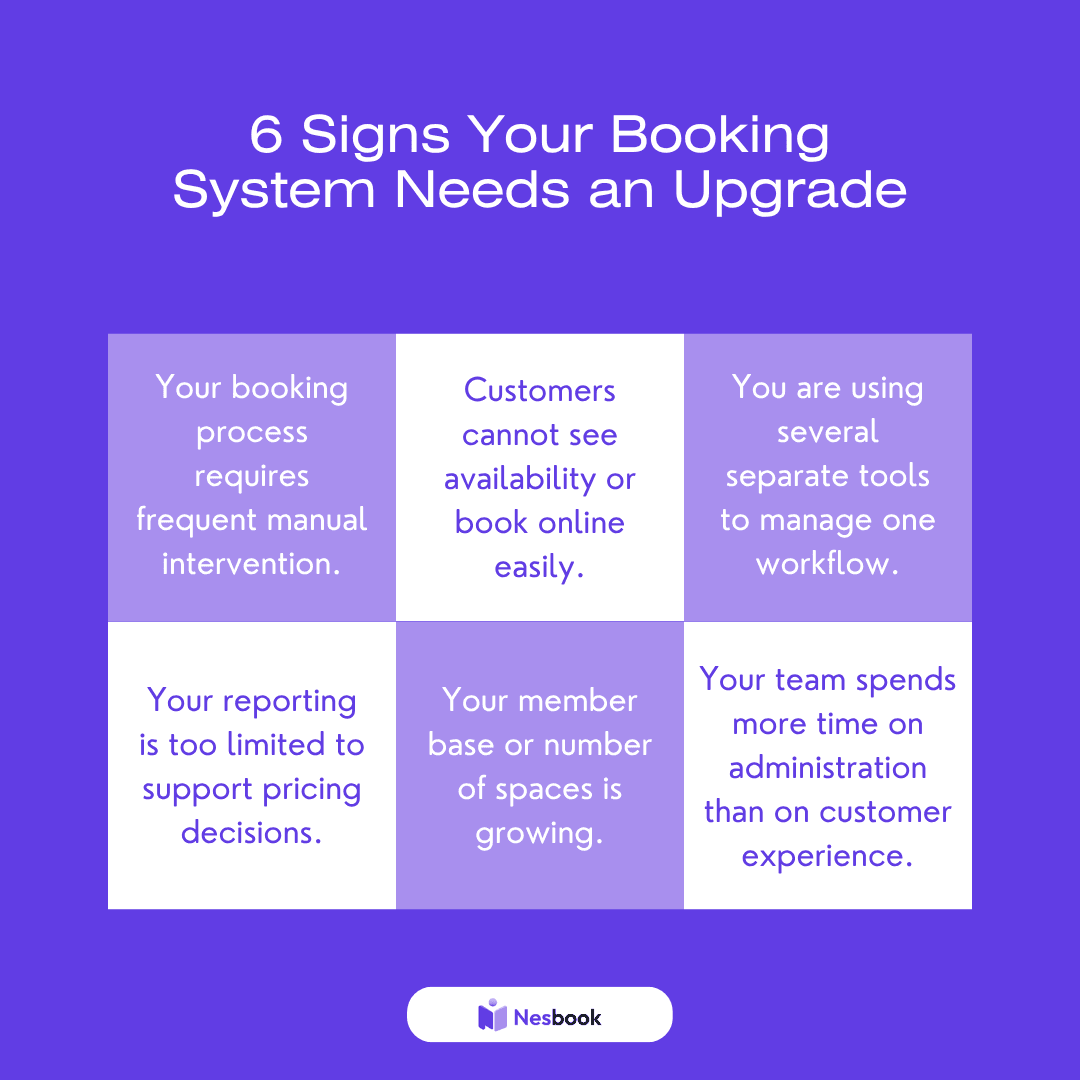
An upgrade does not always mean choosing the most expensive platform. It means choosing a system that better matches the complexity of your operation. If a more complete platform can replace several separate tools, it may offer better value even if its subscription price is higher.
For example, if you are comparing a low-cost booking calendar with a platform that includes scheduling, payments, customer notifications, and analytics, compare the full workflow rather than the calendar price alone. The right platform should make it easier to manage bookings and deliver a reliable customer experience.
Choosing Affordable Shared Workspace Booking Software
Before choosing affordable shared workspace booking software, compare the complete operating cost rather than the monthly subscription alone. A tool that saves staff time, reduces booking errors, and keeps payments and customer communication organized may offer better value than a cheaper system that requires several additional tools.
The right platform should help your workspace operate more efficiently while giving customers a simple way to reserve space. Review what is included, what you may need to add, and how the total cost changes as your business grows.
See What Nesbook Includes
Find out how Nesbook can simplify bookings, payments, and daily workspace operations. Compare the features you need with the costs of managing separate tools. Give your team a more efficient way to manage reservations and customer communication. You can begin by exploring what Nesbook includes. Contact our team today to learn more.
Frequently Asked Questions
What is affordable shared workspace booking software?
Affordable shared workspace booking software is a platform that helps customers reserve desks, meeting rooms, or other bookable spaces while giving operators tools to manage availability and reservations. The right option depends on the size of your workspace, booking volume, and the features you need.
What should I look for in the best coworking booking software?
Look for software that supports your current booking process, makes availability easy to manage, and includes the payment, notification, and reporting features your team needs. Compare the complete cost of operating the platform rather than focusing only on the entry-level subscription.
Are top workspace booking platforms always the most expensive?
No. The most expensive platform is not automatically the best fit. A smaller workspace may only need a straightforward booking system, while a growing operation may benefit from a more complete platform that reduces the need for separate tools.
What hidden costs should I check before choosing booking software?
Check payment processing fees, additional charges for members or spaces, extra costs for reporting or integrations, and the time required to manage separate tools. These costs can affect the real value of a low-cost booking platform.
When should a workspace move from a basic booking tool to a more complete platform?
Consider upgrading when your team is spending too much time managing reservations, payments, or customer communication manually. An upgrade may also make sense when you add more spaces, members, or locations and need better reporting or operational control.